case study · the music engine
ap-studiobeatwave
How the engine that composes Asteroid Pong’s music in real time was built. AP-STUDIO BEATWAVE started as the workshop where that engine was designed: a procedural music studio that runs entirely in the browser. This page explains how it works, the decisions behind it and what the project taught us.
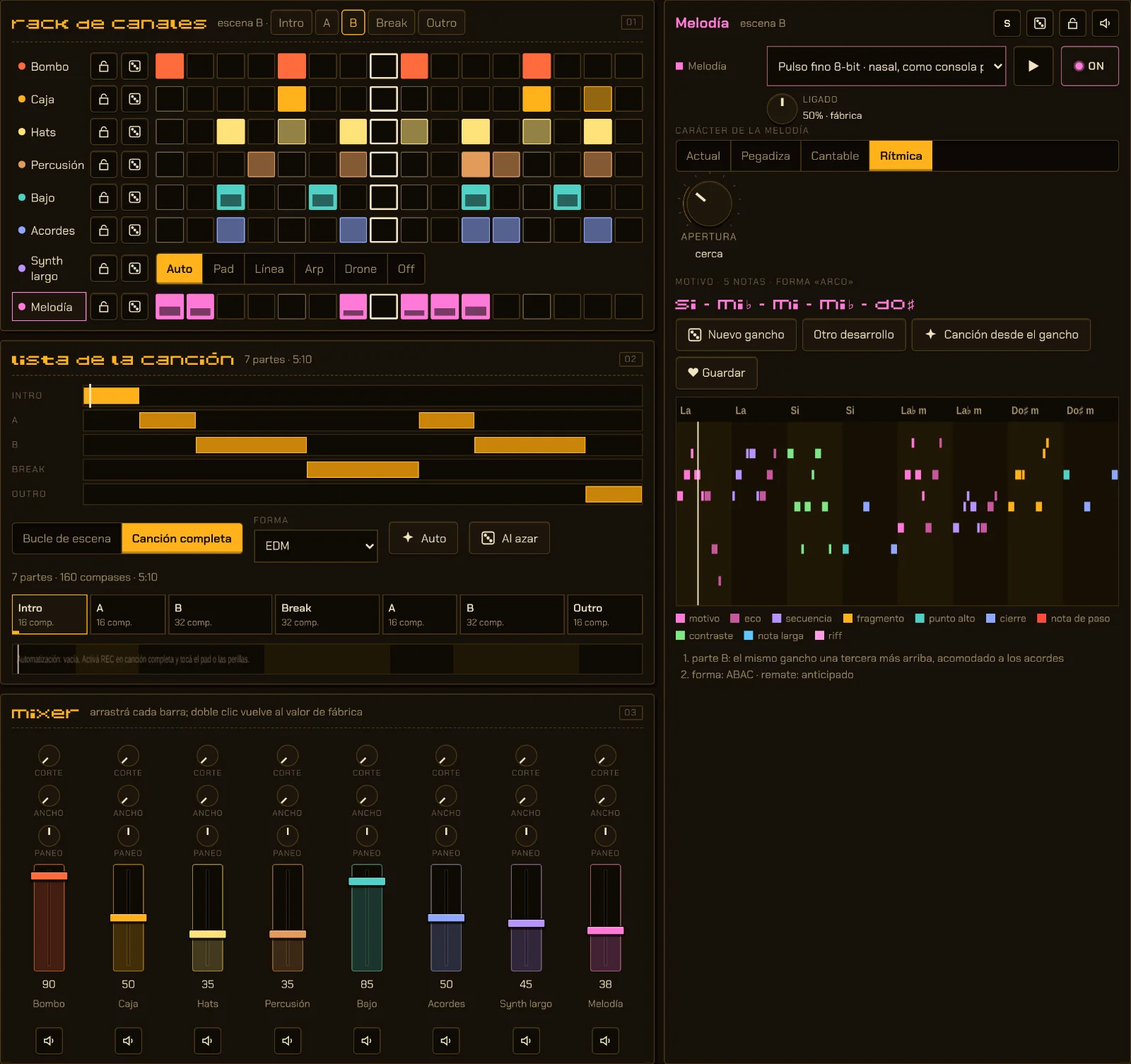 fine-tune · desktop view
- 17genres
- 6time signatures
- 9seasons
- 9gestures
- 8channels
- −14LUFS on export
Hours of non-repeating music, in a small game.
A short-session game played again and again needs hours of music that follows what happens on screen and never gets tiresome. With recorded tracks, that means hundreds of megabytes of audio and loops you recognize within ten minutes.
Different music every game, changing with how you play, and small enough for a web game and an Android app with no big downloads.
Instead of playing songs back, an engine composes them as they play, with the rules a composer would use for each genre, and synthesizes every sound live with WebAudio.
Tuning the engine meant hearing it, playing with it and measuring it. That is how AP-STUDIO BEATWAVE came to be: the same engine with controls, screens and mixing tools, where what you hear in the game comes from.
Design, composition and direction: Daniel J. Campos Lozada (NoamDan). JavaScript and WebAudio in a single page: every sound is synthesized in its own code, and automated tests render tracks and measure them.
From three notes to a whole song.
The engine works like a methodical composer: first a small idea you can remember, then the phrase, and finally the form. Every track grows from a seed, which is written down in its info sheet.
- MotifA cell of 3 to 6 notes with its own rhythm. It has a character: catchy, singable or rhythmic.
- An 8-bar phraseThe motif comes back as an echo, a sequence or a fragment, climbs to a high point and resolves. The Openness knob decides how much it changes: to the left it repeats almost unchanged; to the right it leaps and uses passing notes.
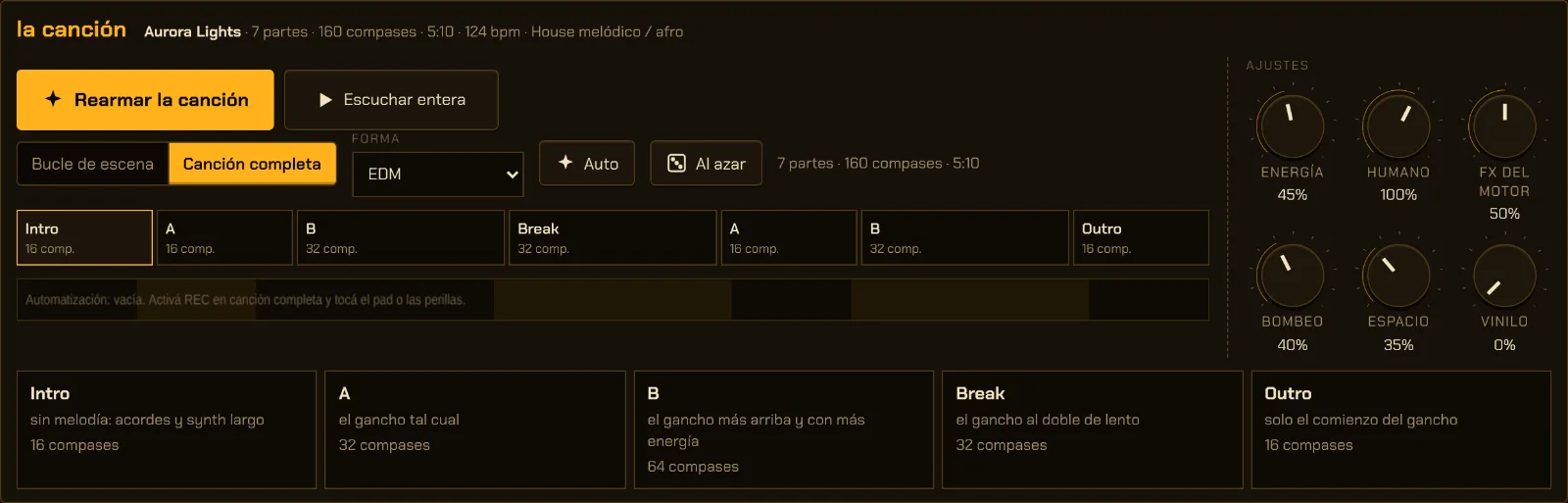
- A song with a formThe phrase is spread over parts: intro, A, B, break and outro. Each genre has its own forms (Pop, EDM, Lo-fi, Hip-hop, Cinematic and others), and the engine picks among the ones that fit.
- Intro16 bars
- A16 bars
- B32 bars
- Break32 bars
- A16 bars
- B32 bars
- Outro16 bars
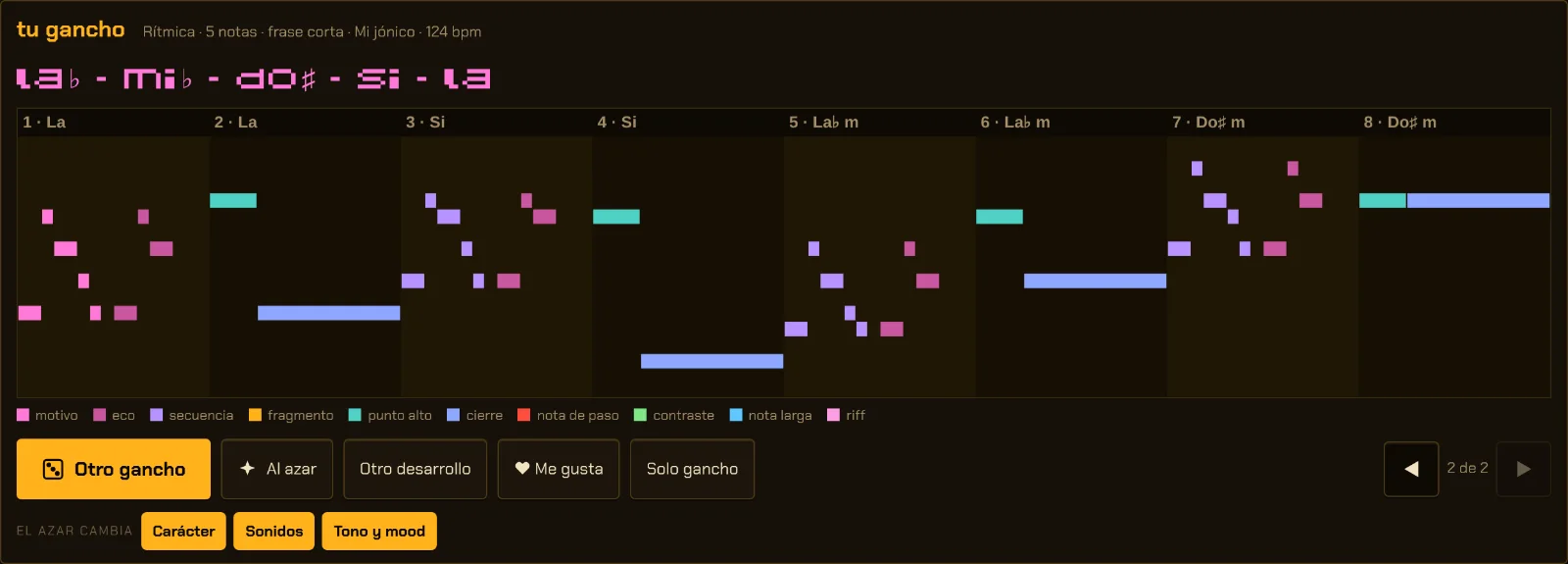
The hook’s rules
- Strong beats and long notes always land on chord tones.
- Passing notes that resolve by step.
- No leaps wider than a sixth, within a limited range.
- 7 melody shapes (call and response, AABA, ABAC, 1- and 2-bar riffs, long notes, short phrase) and 7 endings.
- In the B part, the hook moves up a third.
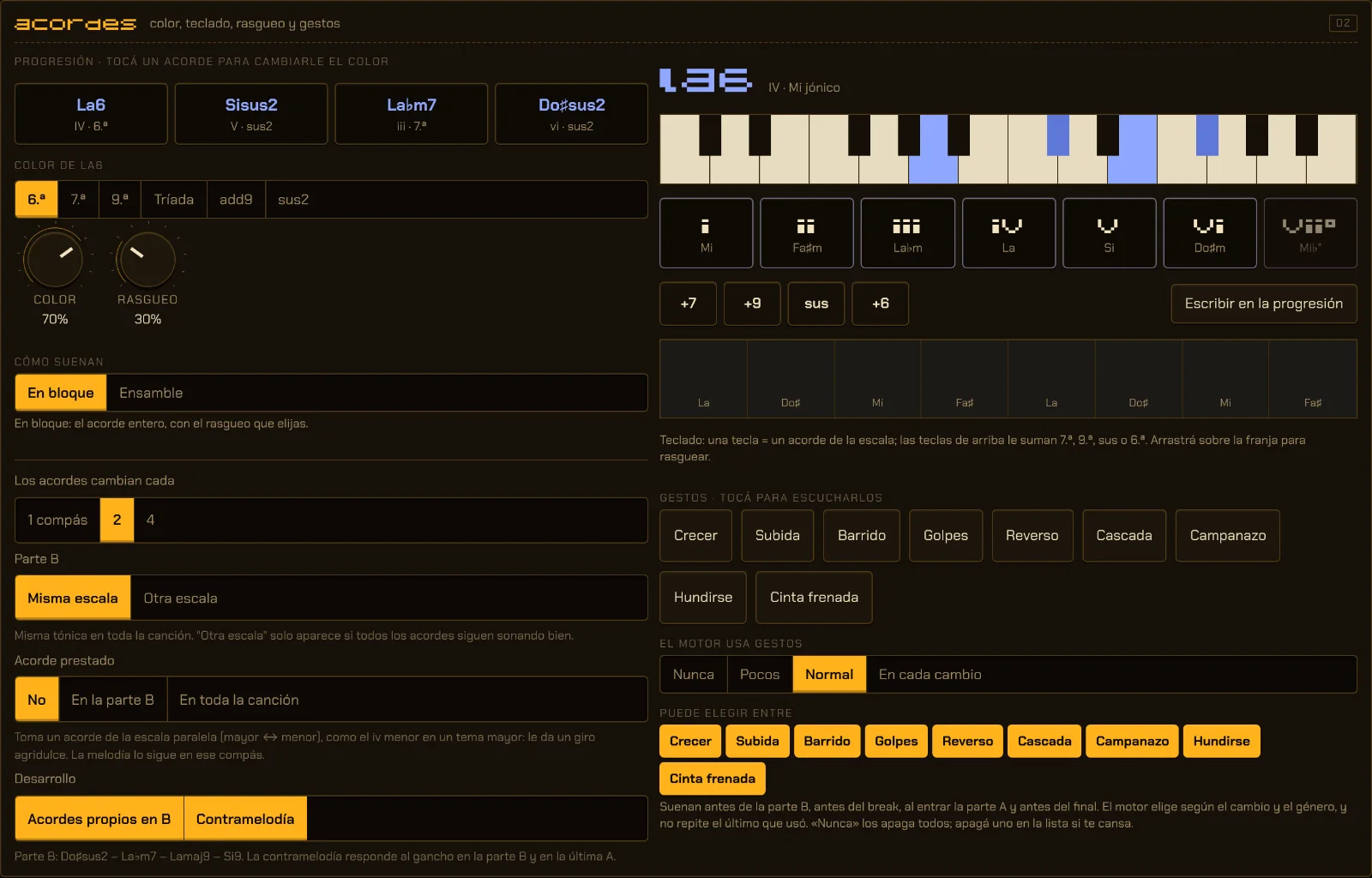
Harmony that never clashes
A 4-chord progression, curated for each genre or freshly built and functional (tonic, pre-dominant, dominant), always in the song’s key. Color (7ths, 9ths, add9, sus2, sus4, 6ths) is picked only from what sounds right in the scale: tested on 600 tracks, not a single clash.
Chords are voiced for the smallest movement from one to the next, including the jump from the last back to the first. Across 1400 progressions, none moves more than before and 732 move less.
The B part uses another progression in the same key, starting on a different chord with a bit more color; it can also switch scale while keeping the tonic. Tested on 240 tracks: the B hook always lands on chord tones.
A soft second voice, an octave below, that answers the hook in its gaps with chord tones stepping down. It plays in the B part and in the last A.
17 genres, each with its own rules.
A genre is more than a tempo: it brings its drums, its swing, its sounds, its song forms and its own way of humanizing. These are the 17, with their typical tempos.
- Lofi channel70–90 bpm
- Lofi house lounge112–124 bpm
- Raw lofi house122–130 bpm
- Chill synthwave85–115 bpm
- Melodic techno + trance126–135 bpm · game
- Melodic / afro house120–128 bpm · game
- Liquid DnB168–174 bpm · game
- Melodic jungle160–170 bpm · game
- Neurofunk170–178 bpm · game
- Boss theme120–160 bpm · game
- Chiptune110–150 bpm
- Pocket 4-bit100–140 bpm
- Ambient50–70 bpm
- Cinematic60–90 bpm
- Boom-bap hip-hop85–95 bpm
- Trap / drill130–145 bpm
- UK garage130–135 bpm
The ones marked “game” are the genres grouped by the Mixing view’s “Game journey” shortcut. Tempo can be changed by hand; the Studio tells you when it falls outside the genre’s typical range.
Drums are rewritten for each one: the waltz in 1-2-3, 6/8 in two beats, 5/4 as 3+2, 7/8 as 2+2+3. Bass, chords and melody adapt to the new meter. You pick it when generating or live.
Halloween, Day of the Dead, Christmas, New Year, Meteor Shower, Spring, Summer, Autumn and Winter. Each one adds its own progressions to any genre, plus sound layers: trumpets and bells for Day of the Dead, sleigh bells and choir for Christmas, a countdown and fireworks for New Year. In automatic mode, the season comes from the date.
Swell, Rise, Sweep, Hits and Reverse before the B part; Sink and Tape Stop before the break; Cascade and Bell Toll as the A part comes in and at the end. Each one lands exactly on the change of part; the engine chooses by genre and never repeats the last one it used.
Halloween, for example, always plays in harmonic minor or Phrygian and adds a detuned music box, tremolo strings, a heartbeat every 8 bars and whispers.
Neither perfect nor sloppy: human.
A machine that plays perfectly in time sounds like a machine. The Studio nudges every hit and every note a little, the way each genre would, and leaves the accents alone.
100% is each genre’s own amount, 0% is dead on the grid, and it goes up to 167%. It never goes beyond ±20% velocity or ±25 ms, and full-strength hits and the song’s first step are never touched. It moves drums, melody, bass and chords, and it is in every view.
The kick pushes the rest of the mix down, like sidechain in electronic music, with its own amount for each group of instruments and a release time that follows the tempo.
Before an A or B part comes in, the snare plays a fill on the last beat of the bar, the way a drummer would. It can be switched off in the engine options.
Melody, chords and long synth each have a Legato knob: from a clipped note to one that holds and joins the next with no gap. Every sound comes with its own default.
A radio station that never ends.
In the Mixing view, the engine creates one track after another and blends them on two decks, like a DJ: one fades down as the other comes up, the bass swaps halfway through the blend, the tempo glides from one track to the next, and only compatible keys meet (the same key, a fifth or a fourth).
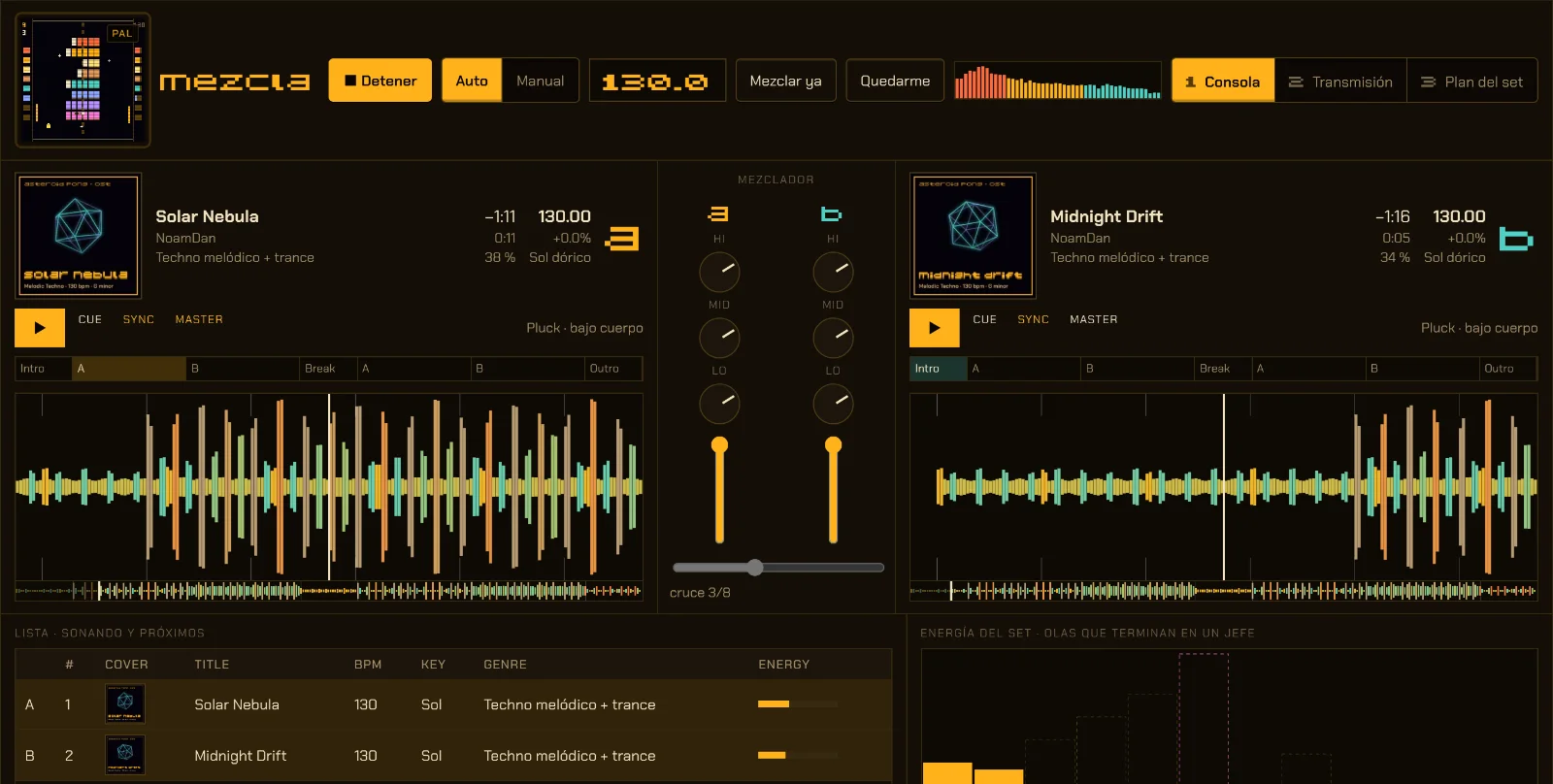
Waves (default): warm-up, rise, a boss-theme peak and a breather, over 4 to 6 tracks; each wave starts a little higher. Long climb: about 14 tracks rising to the boss and 3 to close. Steady: even energy.
With “Relative”, the next track shares a compatible key, a neighboring mood, a tempo from the same family (no jumps above 12%), half of the sounds and a hook with the same motif rhythm and different notes. Measured over 12 tracks: about 5 of 8 sounds carry over and there are no tempo jumps. “Cousin” and “Free” loosen it up.
The Mixing view can imagine someone playing: if they advance, the wave climbs; if they get stuck, the wave holds and the energy drops a little. It is the same idea as in the game, where the music follows how you are playing.
From idea to distributor-ready files.
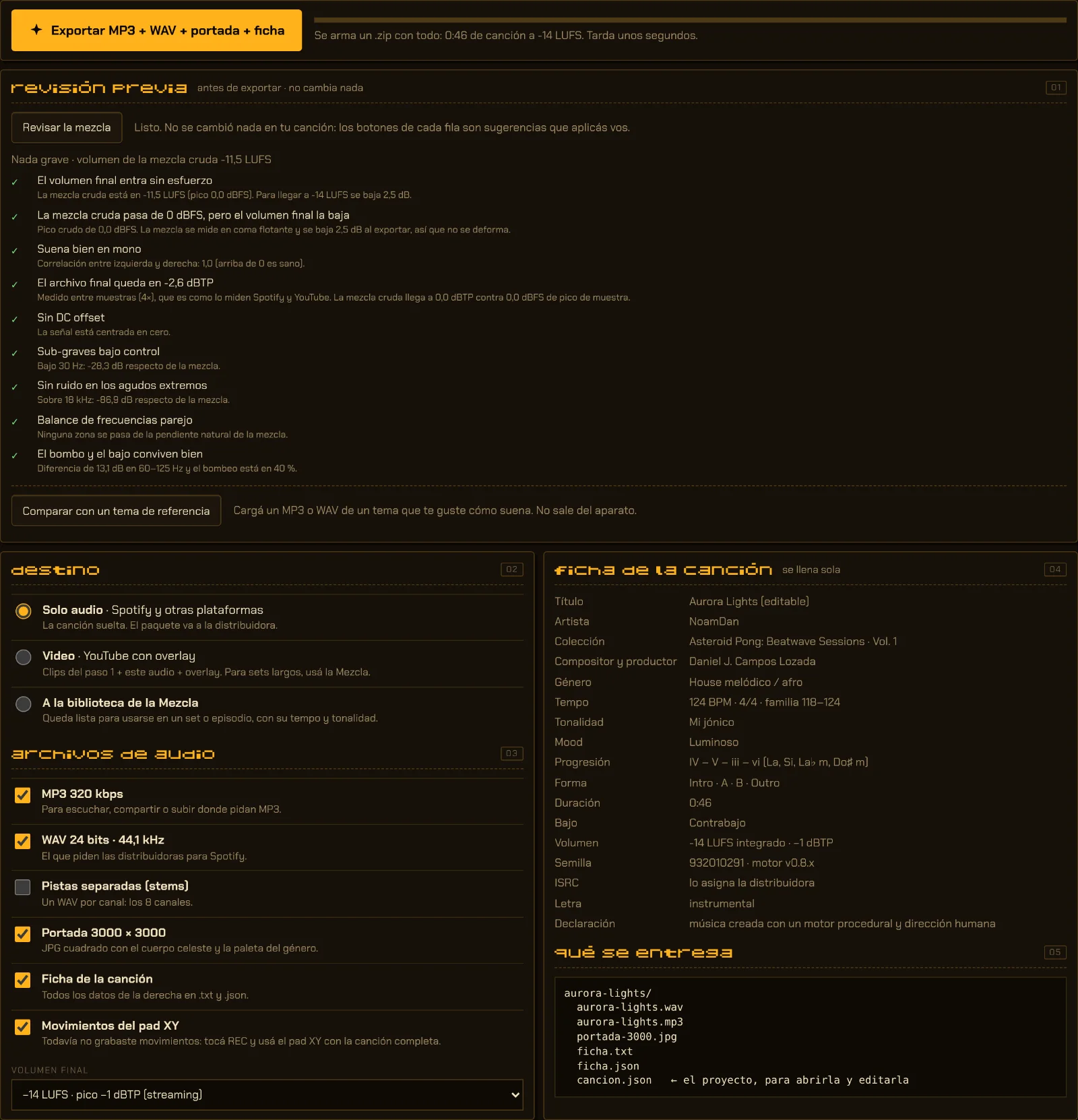
Export builds a .zip with what a distributor asks for to release on Spotify and other platforms. The song is rendered offline, about 15 times faster than listening to it.
aurora-lights/
  aurora-lights.wav    24-bit WAV · 44.1 kHz
  aurora-lights.mp3    MP3 320 kbps
  stems/               one WAV per active channel
  portada-3000.jpg     3000 × 3000 cover art
  ficha.txt · .json    the song’s metadata
  cancion.json         the project, to edit it
- Loudness
- −14 LUFS integrated, measured with the streaming standard (ITU BS.1770), and a −1 dBTP true peak measured between samples, the way Spotify and YouTube measure it. Tested: −14.0 LUFS in both WAV and MP3.
- Pre-export check
- Before exporting, without changing anything, it checks peaks, true peak, clipping, mono compatibility, DC offset and extreme lows or highs in the raw mix.
- Reference track
- With a reference track loaded, the Studio compares loudness, true peak, stereo width and balance by range, and suggests which channel to adjust. The file is analyzed on the device, never uploaded.
- Balance diagnosis
- It measures the mix in third-octave bands against its own slope, names the symptom (muddy, boxy, harsh, boomy, thin), solos each channel to find the culprit and offers one button per fix. Fixes are applied by hand, one at a time: it is a guide, not the absolute truth.
- Info sheet
- Title, artist, collection, composer, genre, tempo, key, progression, form, length and seed. It fills itself in.
Describe it and the engine builds it.
In “Ask for a track in words” you type what you want, and the Studio picks up genre, key, mode, tempo, time signature, instruments and a few reference artists.

- What you write wins over what a reference suggests.
- If it understands nothing, it asks instead of making things up.
- A reference is an approximation of the recipe, not a copy.
- It works offline: it recognizes keywords inside the page itself and sends your text nowhere.
Requests it understands
- lofi in A minor at 85 bpm with piano
- sad cinematic in 3/4
- dark trap at 140 bpm
- calm ambient at 60 bpm
The Studio’s interface is in Spanish, but the box also understands these English keywords.
The same engine you hear when you play.
The Studio starts from the game’s music engine, with the same music-theory tables, and gives it controls. That is why what gets tried here can make its way back into the game.
In Asteroid Pong the music starts in techno and moves through drum & bass and jungle all the way to breakcore, from 124 to 194 BPM, following your level and how you are playing.
Every boss has its own theme, between 166 and 176 BPM. In the Studio, “Boss theme” is one more genre, and in the Mixing view every wave of the set peaks with a boss.
The game’s jukebox plays the boss themes in modern, pocket 4-bit and chiptune: the same three sound modes you choose in the Studio.
A switch plays the melody, bass and sounds exactly as they are in the game today, to compare them with what is new.
The first thing to move from the Studio into the game is three new bass tones (sub, body and reese), which the game’s engine can pick alongside the original. The game’s melodies, genres and effects stay as they are.
A single file, in the browser.
Every sound is synthesized live with WebAudio, the browser’s audio API. The whole Studio, MP3 encoder included, is a single web page.
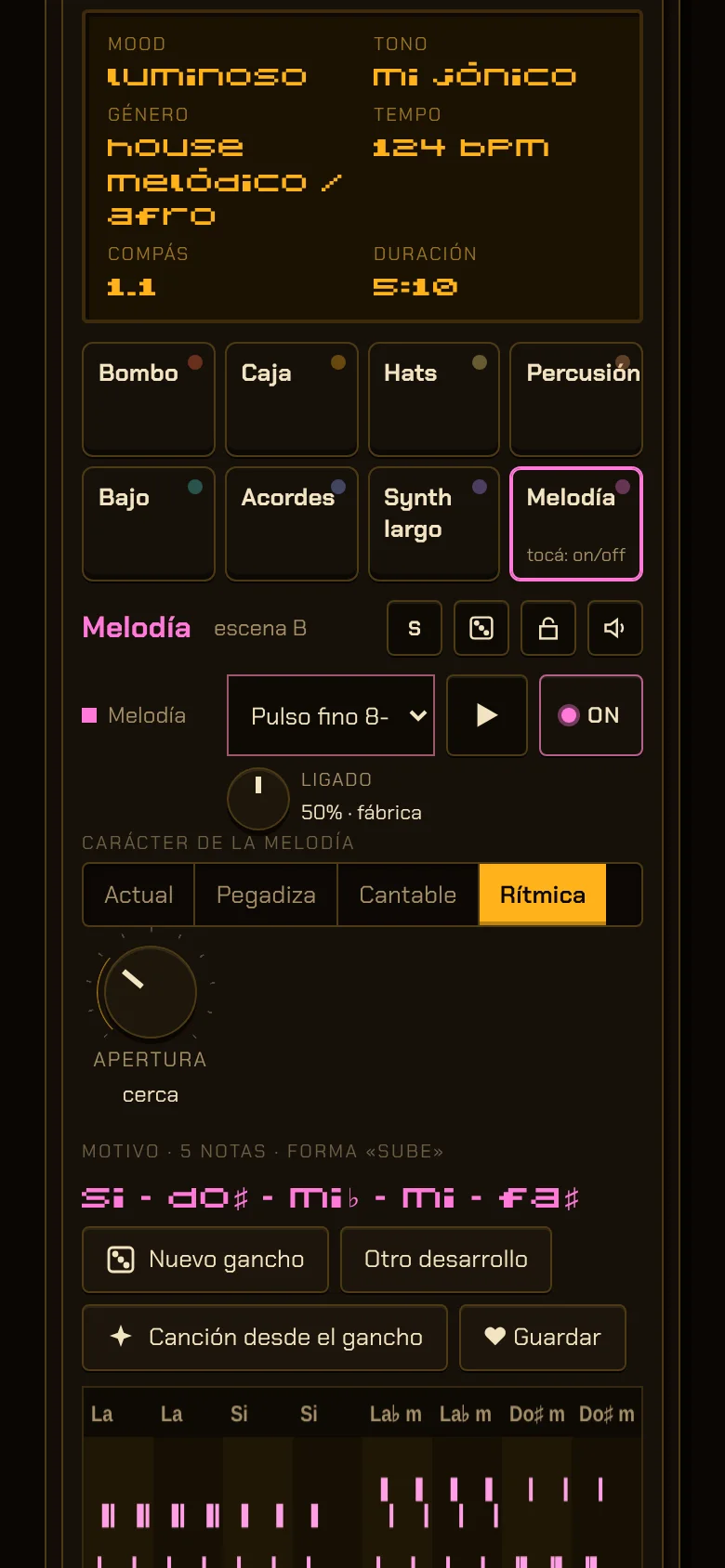
Desktop: rack, song list and mixer, to produce with a mouse. iPad: scenes and an XY pad, to play live with your fingers. Phone: a groovebox, for quick sketches. The mixer, with low cut, width and pan on every channel, is in all three.
Notes are scheduled at least 300 ms ahead, and further on slow devices: the Studio measures how long it takes to redraw the screen and adapts. Effects land on the exact time of their step. In a test with the processor slowed down six times: zero late notes (before, up to 161 ms late).
Seven effect scenes: filter, mood + energy, delay, stutter, gate, sidechain and reverb echo. REC records the pad and the knobs as automation.
Every sound went through a separate Sound Lab, where it was voted to stay, go, or remain only as a manual pick.
What the project taught us.
The first melodies were random walks: technically in key, but with nothing to remember. What made them catchy were simple craft rules: a motif that returns, chord tones on strong beats and passing notes that resolve.
Every promise became a test: no chord clashes across 600 tracks, −14.0 LUFS measured with the streaming standard, true peak below −1 dBTP. Nearly 50 automated tests render audio and measure it before every change.
A late note is audible even when the screen looks perfect. Separating UI drawing from the clock and letting the look-ahead adapt to the device brought late notes to zero, even with the processor slowed down six times.
Every sound went through a voting lab: it stays, it goes, or it remains a manual pick. Numbers help find problems, but what gets released is decided by a person listening.
An engine suggests. A person decides.
Asteroid Pong’s music and AP-STUDIO BEATWAVE are composed and directed by Daniel J. Campos Lozada, who releases music as NoamDan, in Buenos Aires. The engine suggests hooks, forms and sounds; what stays, what changes and what gets released is decided by a person.
That is why every info sheet the Studio exports says so (in Spanish):
«música creada con un motor procedural y dirección humana»
“music created with a procedural engine and human direction”
The MP3 encoder is lamejs (LGPL-3.0 license).